You get an email or open an envelope. Inside is an invitation. Before you even read a single word – before you know who is hosting, what the occasion is, or where it’s happening, you have already made a snap judgment. You instantly feel a vibe. Is this going to be a stuffy corporate meeting? A wild party? A fancy gala?
That gut feeling isn’t magic. It’s psychology.
Every choice you make when designing an invite, from the shade of blue to the curve of a letter, sends a signal to your guest’s brain. These visual cues trigger emotions and expectations. Most importantly, they influence the one thing you care about most: whether that person clicks “Yes” or “No.”
Design isn’t just about making things look good, it’s a powerful tool for communication. By understanding how the human brain processes visual information, you can create invitations that not only grab attention but drive action. With the right invitation maker, you can master the use of colors, fonts, and layouts to turn a “maybe” into a definite “yes.” Let’s explore the science behind designing invitations that get results.
The 50-Millisecond First Impression
Science tells us that people form an opinion about a visual design in about 50 milliseconds. That is faster than the blink of an eye. In that tiny sliver of time, your guest decides if your event looks professional, exciting, or boring.
If your design feels cluttered or chaotic, the brain’s immediate reaction is to pull away. This is known as “cognitive load.” When something looks hard to process, we subconsciously label it as “work.” You never want your party to feel like work.
On the other hand, a clean, balanced design signals ease. It tells the brain, “This is organized. This will be fun. This is worth my time.” Your goal is to reduce that cognitive load so the path to the RSVP button feels like a slide, not a staircase.
Color Psychology: Setting the Mood
Color is the loudest voice in the room. It is the first thing we see and the element most tied to memory and emotion. Different colors stimulate different chemical reactions in the body. Understanding this can help you pick a palette that matches your event’s goal.
Red and Orange: Urgency and Energy
Warm colors like red and orange are physical stimulants. They can actually increase heart rate and blood pressure slightly. They scream energy, passion, and excitement.
If you are hosting a launch party, a concert, or a limited-time sale, these colors work wonders. They create a sense of urgency (FOMO is real). However, use them sparingly. Too much red can signal danger or aggression. It’s often best used as an accent color for your RSVP button to make it pop against a neutral background. This is called the “Von Restorff effect,” or the isolation effect, which predicts that an object that differs from the rest is most likely to be remembered.
Blue and Green: Trust and Harmony
Cool colors are the heavy lifters of the corporate world for a reason. Blue is universally associated with trust, stability, and calm. It lowers the heart rate. If you are asking people to commit their time or money to a professional workshop or a fundraiser, blue reassures them that you are legitimate and organized.
Green, naturally, connects to growth and balance. It’s perfect for wellness retreats, outdoor events, or anything related to sustainability. It tells the guest to expect a refreshing experience.
Black and Gold: Exclusivity and Luxury
Want to charge a high ticket price? Black is your best friend. In design psychology, black signifies sophistication, mystery, and substance. When paired with metallic accents like gold or silver, it creates a perception of high value.
This combination signals that the event is exclusive. It tells the guest, “This isn’t for everyone; it’s for you.” It primes them to dress up, spend money, and expect a premium experience.
The Contrast Factor
Regardless of the colors you pick, contrast is non-negotiable for RSVP rates. If you put light gray text on a white background, you are asking the reader’s eyes to work hard. Remember cognitive load? If they have to squint to read the date, they are less likely to commit. High contrast, like dark text on a light background, improves readability and makes the decision-making process feel smoother.
Typography: The Body Language of Text
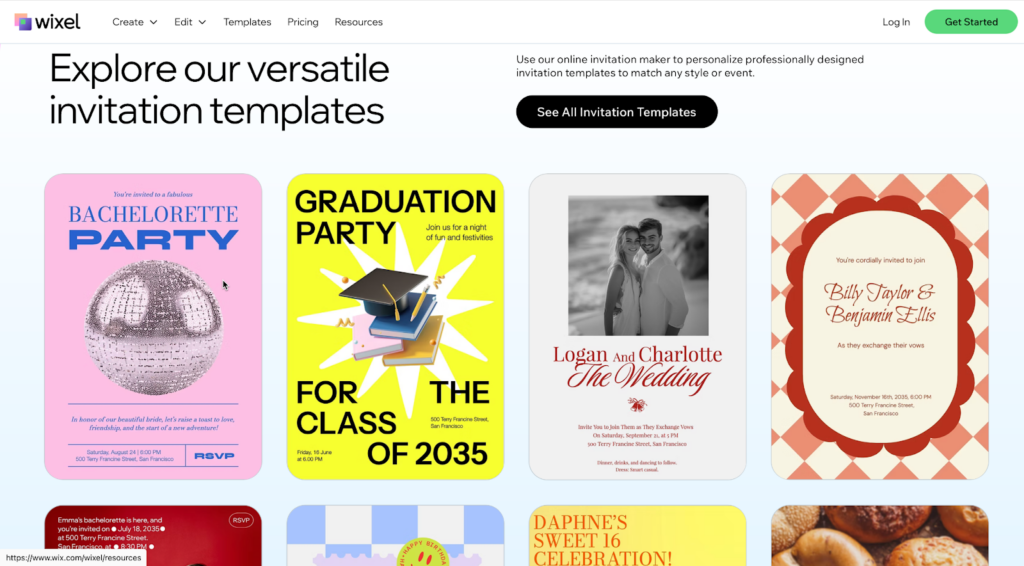
If color is the emotion, typography is the voice. The font you choose tells the reader how to read your message. Is it a whisper? A shout? A formal declaration?
There is a psychological concept called the “fluency effect.” It states that if the form of the text is difficult to read, people perceive the activity described in the text as difficult to do.
Let that sink in. If you use a messy, complicated font for your event details, your guests subconsciously think, “Going to this event seems hard.”
Serif Fonts: Tradition and Respect
Serif fonts (the ones with the little feet at the ends of letters, like Times New Roman) feel established. They imply history and reliability. Use these for formal weddings, academic conferences, or legal seminars. They say, “We follow the rules, and we respect tradition.”
Sans Serif Fonts: Modern and approachable
Sans serif fonts (smooth edges, like Arial or Helvetica) are clean, human, and modern. They are the standard for tech events, casual meetups, and startups. They feel open and friendly. Because they are easier to read on screens, they are often the best choice for digital invites.
Script Fonts: Emotion and Elegance
Script fonts mimic human handwriting. They feel personal and creative. We often see them on wedding invites because they signal intimacy. However, they are dangerous territory. A script font that is too curly or elaborate can become unreadable very quickly.
The Golden Rule: Never use a script font for the critical logistics (time, date, location). Use it for the header or the names, then switch to a clean Sans Serif for the details. This gives you the emotional hook without sacrificing clarity.
Layout and Hierarchy: Guiding the Eye
You have picked your colors and fonts. Now, how do you put them together? You need to act like a traffic cop for your guest’s eyes. You don’t want them wandering aimlessly; you want them to head straight for the “Yes” button.
The Z-Pattern
For invites with less text (which should be most of them), the human eye tends to follow a “Z” pattern.
- Top Left: The eye starts here. This is usually where your logo or the host’s name goes.
- Top Right: The eye scans across.
- Center: The eye cuts diagonally down through the middle. This is prime real estate for your main image or the event title.
- Bottom Right: The eye finishes here. This is exactly where your RSVP button should live.
By aligning your design with this natural behavior, you make the reading experience effortless.
The F-Pattern
If your invite is text-heavy, like a conference agenda, people scan in an “F” shape. They read the top line, skip down a bit, read across again (but not as far), and then stick to the left margin.
To work with this, keep your text left-aligned. Bullet points are your best friend here. Don’t bury the location in the middle of a paragraph. Put it on its own line, bolded, on the left side.
White Space is Your Friend
One of the biggest mistakes in invitation design is “fear of empty space.” You might feel the need to fill every corner with confetti graphics or extra details. Don’t.
White space (or negative space) gives the eyes a place to rest. It acts as a spotlight. The more empty space you put around an object, the more importance you give it. If you want people to click RSVP, give that button plenty of breathing room. Don’t crowd it with other links or images. Isolation creates focus, and focus drives action.
The Power of Specific Wording
While this is an article about design, the visual shape of your words matters.
Consider the RSVP button itself. A button that says “Submit” looks like a tax form. It feels bureaucratic and cold. It’s a “friction word.”
Compare that to “Join the Party” or “Save My Seat.” These are “benefit words.” They remind the user of what they get, not what they have to give.
Also, consider the size of the commitment. “Register” sounds like a process. “I’m In” sounds like a decision. Design your button to be big enough to tap easily on a phone (at least 44 pixels high is the standard), and use text that feels like a natural “yes.”
Putting It All Together: The Trust Equation
Ultimately, an invitation is a request for trust. You are asking someone to trust you with their Friday night or their budget.
A cohesive design builds that trust. When your colors match the emotion, your fonts are readable, and your layout is logical, you signal competence. You tell the guest, “We have our act together.”
If you send an invite with five different fonts, clashing neon colors, and a tiny RSVP link hidden in a wall of text, you signal chaos. The guest subconsciously worries that the event itself will be disorganized. They imagine long lines, bad food, or confusion.
Tips for Testing Your Design
You don’t have to guess if your psychology is working. You can test it.
- The Squint Test: Step back from your screen and squint your eyes until the design gets blurry. What stands out? It should be the most important element (like the event name or the RSVP button). If the first thing you see is a decorative flower in the corner, your hierarchy is off.
- The 5-Second Test: Show your design to a friend for exactly five seconds, then hide it. Ask them two questions: “What is the event?” and “How do I sign up?” If they can’t answer both, you need to simplify.
- Mobile Check: Most invites are opened on phones. A layout that looks spacious on a desktop might look cramped on a mobile screen. Always preview your design on the smallest screen possible.
Conclusion
The next time you sit down to create an invitation, stop looking at it as just a piece of graphic design. Look at it as a conversation with your guest’s brain.
Are you shouting or whispering? Are you making it easy or hard? Are you creating excitement or anxiety?
By using the psychology of color, the clarity of good typography, and a smart layout, you do more than just make something beautiful. You remove the mental barriers standing between your guest and your event. You make the “Yes” feel inevitable. So, go bold with your colors, keep your fonts clean, and give that RSVP button the spotlight it deserves. Your guest list will thank you.

Amelia
Amelia is a skilled writer specializing in AI, creating engaging content that informs and inspires. She stays ahead of the latest trends to help businesses connect with their audience in a rapidly evolving digital world.
View all postsComments 0
No comments yet. Start the conversation!